

- Managing Shipments
- Packing Slips & Gift Notes
Managing Shipments
Packing Slips & Gift Notes
Packing slips and gift notes are optional and can be added to your shipments on request. This article covers the options we support and the limits to plan around. To get started, contact your Customer Success Manager.
Packing slips
You can use the MasonHub default packing slip or provide your own custom design with some limitations as to what is supported.
Default packing slip
Our default template includes your company logo, the customer and order details, and any gift message the customer added. It is the fastest option to set up.
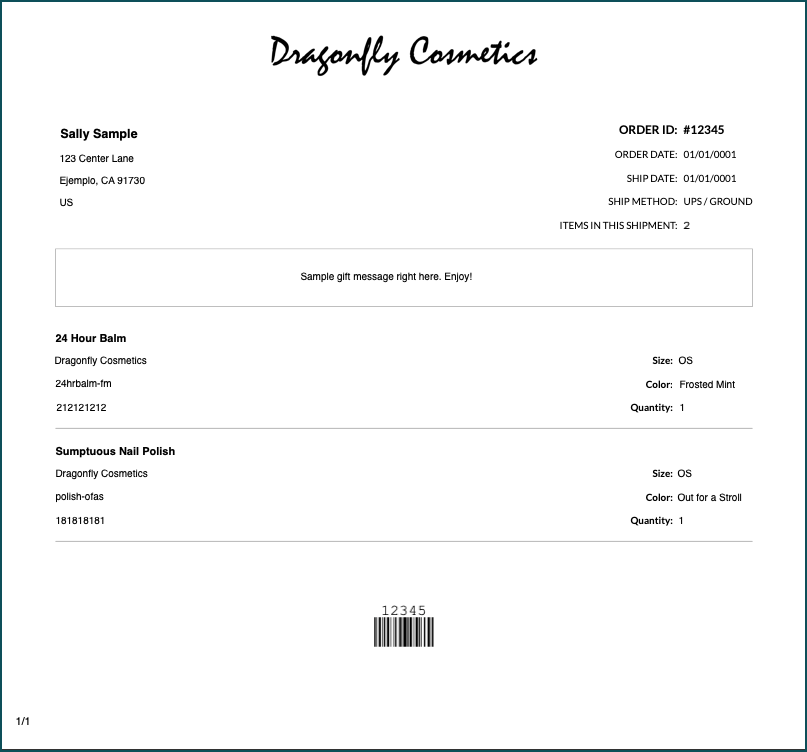
The default MasonHub packing slip accommodates your company’s logo, the customer and order details, and any gift messages the customer added, if applicable.
Custom packing slip
If you need a different layout, formatting, or separate templates for different order types, you can design your own. Custom packing slips must:
- Black and white is required.
- Watermarks are not supported.
- Print on 8.5 x 11 paper.
- Include the order ID, customer information, order dates, and ship method.
- Use a properly licensed font, if you want a custom font. You are responsible for purchasing the font license, making sure it allows MasonHub to install and use the font on your behalf, and then providing the font files to MasonHub.
We also recommend:
- Pagination, so orders can run past one page.
- Leaving space for details that vary by order, such as a gift message that only sometimes appears.
- A separate design for customer and wholesale orders, since wholesale orders are usually larger and ship in multiple shipments.

Example of a custom packing slip design that we can support.
Retailer packing slips for dropship orders
If you dropship for retailers, we can print a retailer’s own packing slip on its orders. This works even if you don’t use packing slips on your own customer orders: we can include a packing slip only for the specific retailers that require one.
Gift notes
We support three ways to include a customer’s gift message with their order.
| Option | Best for | What it looks like |
|---|---|---|
| Gift message on the packing slip | Brands already using our default packing slip | The message prints in a box on the packing slip, above the order items |
| Standalone gift note | Brands that want gift notes but no packing slip | The message prints centered on an 8.5 x 11 sheet, with your logo centered at the bottom |
| Custom gift note* | Brands that want 4 x 6 (A6) cards, specialty paper, or their own layout | Your design, black and white recommended (watermarks are not supported) |
Custom gift note
*For custom gift notes, you provide the printer, ink, and any other printing supplies, plus any specialty paper. Custom fonts follow the same licensing requirements as custom packing slips. Black and white ink is recommended; however, you can provide a color printer and toner as long as it meets IP-networking requirements.
IPP Everywhere certified: The printer must support IPP Everywhere, the industry standard for driverless network printing. This lets our print system connect to it directly over your network without vendor-specific drivers. Look for “IPP Everywhere” on the spec sheet or check the Printer Working Group’s certified printer list before purchasing.
Pre-printed or glossy card stock must be tested on our printers before we can confirm support, since some stock can jam or cause ink to smudge. Your Customer Success Manager can arrange a test with sample cards. We cannot guarantee this can be supported.
We also support handwritten notes, which use a separate process. Contact your Customer Success Manager to learn more.
Important for Shopify merchants
Shopify saves customer gift messages in the order’s Notes field. We print whatever is in that field as the gift message, and we cannot tell a gift message apart from a note added by another app.
Before you turn on gift messages, make sure no other app in your store writes to the Notes field. If one does, those notes will print on your packing slip or gift note, and you will not be able to use gift messages until that app stops writing to Notes.
The one exception is Loop Returns: notes on exchange orders created through Loop are excluded automatically.
What we can’t support
- Color printing on packing slips and stand-alone gift notes. All packing slips and stand-alone gift notes print in black and white. (Custom gift notes on printers and toner you provide may be color.)
- Watermarks.
- Custom fonts without a license that allows MasonHub to install and use them.
- Separating gift messages from other notes in the Shopify Notes field (see above).
- Printers, ink, or specialty paper for custom gift notes. These are provided by you and must be IPP Everywhere certified.
How to request
Contact your Customer Success Manager with the option you want. For a custom packing slip or gift note, include a mockup showing logo and message placement, fonts and font sizes, paper size, and any other layout requirements. Your Customer Success Manager will confirm feasibility before setup begins.