- Account Set Up
- Subscribe to Email Notifications
Account Set Up
Subscribe to Email Notifications
Stay informed with automated, real-time updates by subscribing to our email notifications. You’ll receive timely alerts for important events in your fulfillment process.
Available Email Notifications
- ASN On Dock - Sent immediately when an Inbound Shipment is first on docked at the facility.
- ASN Received - Sent immediately when an Inbound Shipment is finished receiving.
- Rejected Order Summary - Sent twice a day (11 am and 1 pm Pacific) listing out Shopify orders rejected by MasonHub.
- Cancel Request Rejection - Sent immediately when MasonHub rejects an order cancellation request from Shopify.
- Order Shorts - Sent immediately after MasonHub processes an order and is unable to fulfill an item due to damaged or unavailable inventory.
- SKU Catalog Report - Sent twice a day (12 am and 12 pm Pacific) listing SKUs that failed to create or update in MasonHub’s OMS.
- Orders Under Review - Sent three times a day (9 am, 12 pm, and 2 pm Pacific) listing orders that are under review.
- Inventory Threshold Alerts - Sent three times a day (9 am, 12 pm, and 2 pm Pacific) listing SKUs that are at or below the available threshold.
- Low Order Volume Alerts - Sent at 2 AM Pacific if order volume in the last 24 hours falls below the expected threshold.
Requirements
Important: Only users with Admin account profiles can update email subscriptions.
How to Subscribe
Step 1: Access Account Profile
Navigate to Account Management > Account Profile.

Step 2: Select Your Notifications
Click the checkbox next to each email notification you want to receive.

Step 3: Add Additional Recipients (Optional)
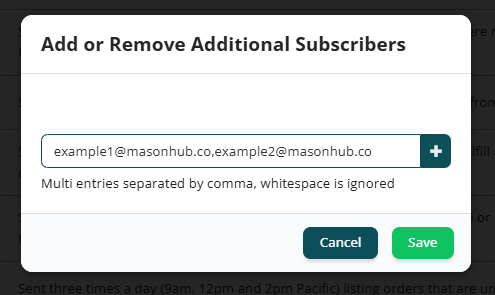
Click Add or Remove Additional Subscribers to include other team members or email distribution lists.
When adding multiple email addresses, separate them with commas.