

- Order Management
- Multi-Facility Order Routing
Order Management
Multi-Facility Order Routing
Learn how MasonHub intelligently routes orders across bicoastal fulfillment centers to optimize shipping speed and costs for your customers.
What is Multi-Facility Order Routing?
What It Is
Multi-facility order routing is MasonHub’s intelligent system that automatically determines the optimal fulfillment center for each order based on destination address and inventory availability. With facilities in California (West Coast) and Pennsylvania (East Coast), MasonHub enables two-day ground shipping to 90% of U.S. customers.
When to Use It
Multi-facility routing is ideal when you:
- Want to reduce shipping costs by fulfilling from the closest facility
- Need faster delivery times to customers across the U.S.
- Have inventory distributed across both coasts
- Want to optimize order fulfillment automatically without manual intervention
How It Works
MasonHub’s routing system evaluates each order using two key factors:
- Destination address - The system first identifies which facility is closest to the customer
- Inventory availability - The system checks if the required inventory is available at the suggested facility
When multi-facility fulfillment is enabled for your account, every order receives two facility designations:
- Suggested Facility - The optimal location based on destination address
- Assigned Facility - The actual facility that fulfills the order (appears after inventory allocation)
Key Benefits
✅ Reduced shipping costs - Orders ship from the nearest facility, minimizing shipping zones
✅ Faster delivery - Two-day ground shipping to 90% of U.S. customers
✅ Automatic optimization - No manual routing required for most orders
✅ Inventory flexibility - Orders can route to alternate facilities when needed
Important Considerations
⚠️ International shipments: Currently ship from the West Coast (Rancho Cucamonga) facility unless you exclusively use the East Coast facility
Routing Policy Options
A default Routing Policy will be set on your Account page, but can be overridden on individual orders by setting the Assigned Facility through API connections, manual order creation in the MasonHub OMS, or manually editing the order in the MasonHub OMS as long as it’s in Open status.
When multiple fulfillment locations are enabled for your Account, you will have the following Routing Policy Options:
Destination & Inventory Routing (Recommended)
Orders primarily route based on destination address, but if the closest facility is out of stock, orders automatically route to the facility with available inventory.
If the next closest facility can fulfill the complete order, the order will be assigned to that location.
If the next closest facility cannot fulfill the complete order:
- Order Split Policy is set to Auto, the order will split into multiple fulfillments assigned to multiple locations based on inventory availability.
- Order Split Policy is set to Manual, the order will be assigned to the facility closest to the destination and go on backorder. It can be manually split in MasonHub’s OMS, or stay on backorder until enough inventory is received at that location.
Best for: Most accounts wanting to prioritize both speed and fulfillment reliability
Destination Only Routing
Orders route strictly to the closest facility based on destination address. If that facility is out of stock, orders go on backorder until inventory arrives at the suggested facility.
Best for: Accounts with advanced forecasting capabilities who want predictable inventory distribution
Manual Routing
Available only when creating orders directly in MasonHub’s OMS. You explicitly choose the fulfillment facility regardless of destination address.
Best for: Wholesale orders requiring specific pickup locations or special handling requirements
State-by-State Routing Guide
Based on typical ground shipping estimates, the United States is divided into two regions. Here’s which facility serves as the primary suggested location for each state:
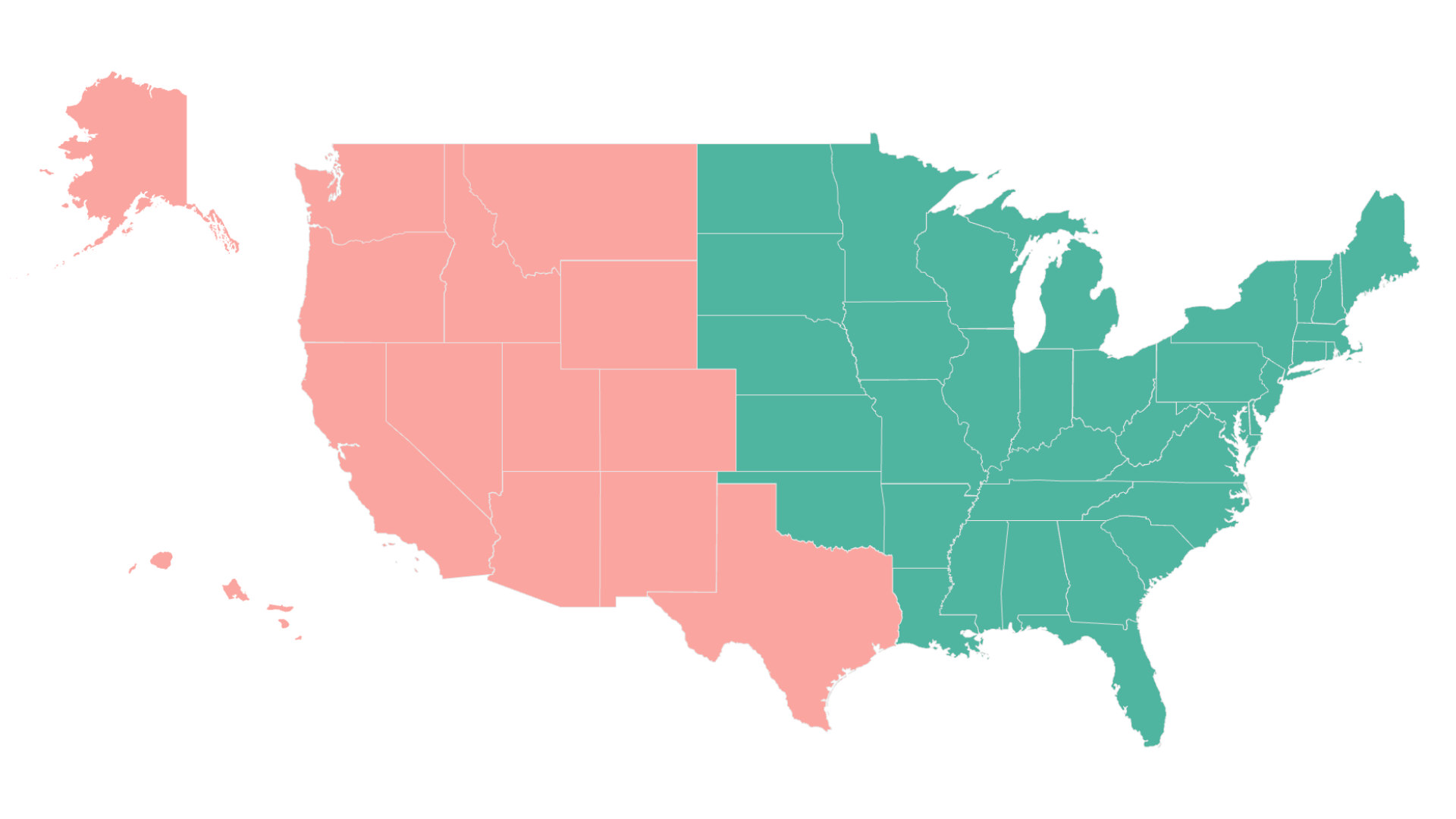
| State | Suggested Facility |
| Alabama | East Coast |
| Alaska | West Coast |
| Arizona | West Coast |
| Arkansas | East Coast |
| California | West Coast |
| Colorado | West Coast |
| Connecticut | East Coast |
| Delaware | East Coast |
| District of Columbia | East Coast |
| Florida | East Coast |
| Georgia | East Coast |
| Hawaii | West Coast |
| Idaho | West Coast |
| Illinois | East Coast |
| Indiana | East Coast |
| Iowa | East Coast |
| Kansas | East Coast |
| Kentucky | East Coast |
| Louisiana | East Coast |
| Maine | East Coast |
| Maryland | East Coast |
| Massachusetts | East Coast |
| Michigan | East Coast |
| Minnesota | East Coast |
| Mississippi | East Coast |
| Missouri | East Coast |
| Montana | West Coast |
| Nebraska | East Coast |
| Nevada | West Coast |
| New Hampshire | East Coast |
| New Jersey | East Coast |
| New Mexico | West Coast |
| New York | East Coast |
| North Carolina | East Coast |
| North Dakota | East Coast |
| Ohio | East Coast |
| Oklahoma | East Coast |
| Oregon | West Coast |
| Pennsylvania | East Coast |
| Rhode Island | East Coast |
| South Carolina | East Coast |
| South Dakota | East Coast |
| Tennessee | East Coast |
| Texas | West Coast |
| Utah | West Coast |
| Vermont | East Coast |
| Virginia | East Coast |
| Washington | West Coast |
| West Virginia | East Coast |
| Wisconsin | East Coast |
| Wyoming | West Coast |
Note: This routing applies to the contiguous United States. Alaska, Hawaii, and international orders have special routing considerations.
Facility Locations
MasonHub operates from two strategic locations:
West Coast Facilities:
- Fontana, California
East Coast Facility:
- Wilkes-Barre, Pennsylvania
Special Routing Scenarios
When shipping from multiple facilities, order routing works in tandem with other special scenarios:
Backorders
All backordered items and oversell policies are tied to a virtual location, allowing flexible allocation upon receipt based on your chosen routing policy. Backorder Priority Allocation article here.
Order Splits
When orders contain items stocked at different facilities, orders can be split into multiple fulfillments (if this feature is enabled on your account). Each fulfillment routes to the facility with the required inventory.
Wholesale Orders
For wholesale orders requiring specific pickup scheduling or compliance with retailer requirements, use manual routing to assign orders to the required facility.
Viewing Routing Information
You can see routing details for each order in the MasonHub OMS:
- Navigate to the order detail page
- Look for Suggested Fulfillment Facility on the order summary - This shows the optimal facility based on destination
- Once allocated, view Assigned Facility on the fulfillment - This shows where the order actually fulfilled from
This information helps you understand routing patterns and optimize future inventory purchasing decisions.

Suggested Fulfillment Facility will be displayed on the order’s summary with other details about the order.

The Assigned Facility will be displayed under each of the order’s fulfillments. If orders split due to lack of inventory at one location, you will see more than one fulfillment that can be assigned to different facilities.
Related Articles
- Split Orders into Multiple Fulfillments - Learn how orders can be split across facilities
- Manage Backorders & Oversell Policies - Configure backorder handling across locations
- Prioritize Backorder Allocation & Fulfillment - Rules for backorder and allocation priority
- Create Individual Orders Directly in MasonHub’s OMS - Use manual routing for specific orders